AI coding assistants are becoming increasingly useful for developers who want to write, understand, and modify code faster. Supermaven is an AI-powered coding assistant designed to provide fast code suggestions while understanding context from larger codebases.
But is Supermaven worth using for your development workflow? In this Supermaven review, we’ll look at its features, pricing, ease of use, pros and cons, and who can benefit most from it.
What Is Supermaven?
Supermaven is an AI coding assistant that provides real-time code completion and contextual suggestions while developers work inside supported code editors.
It is designed to understand more of your project context, helping its suggestions work with existing functions, APIs, files, and coding patterns instead of focusing only on the code currently visible on screen.
Supermaven supports popular development environments including VS Code, JetBrains IDEs, and Neovim, making it suitable for different programming workflows.
What Can You Do With Supermaven?
AI Code Completion
Supermaven provides real-time code suggestions as you type. It can help complete functions, generate repetitive code, work with programming patterns, and speed up everyday development tasks.
Large Context Window
One of Supermaven’s notable features is its 1 million token context window on Pro and Team plans. This allows the assistant to work with significantly more project information when generating suggestions.
This can be particularly useful when working with larger codebases where functions and definitions may be spread across multiple files.
Supermaven Chat
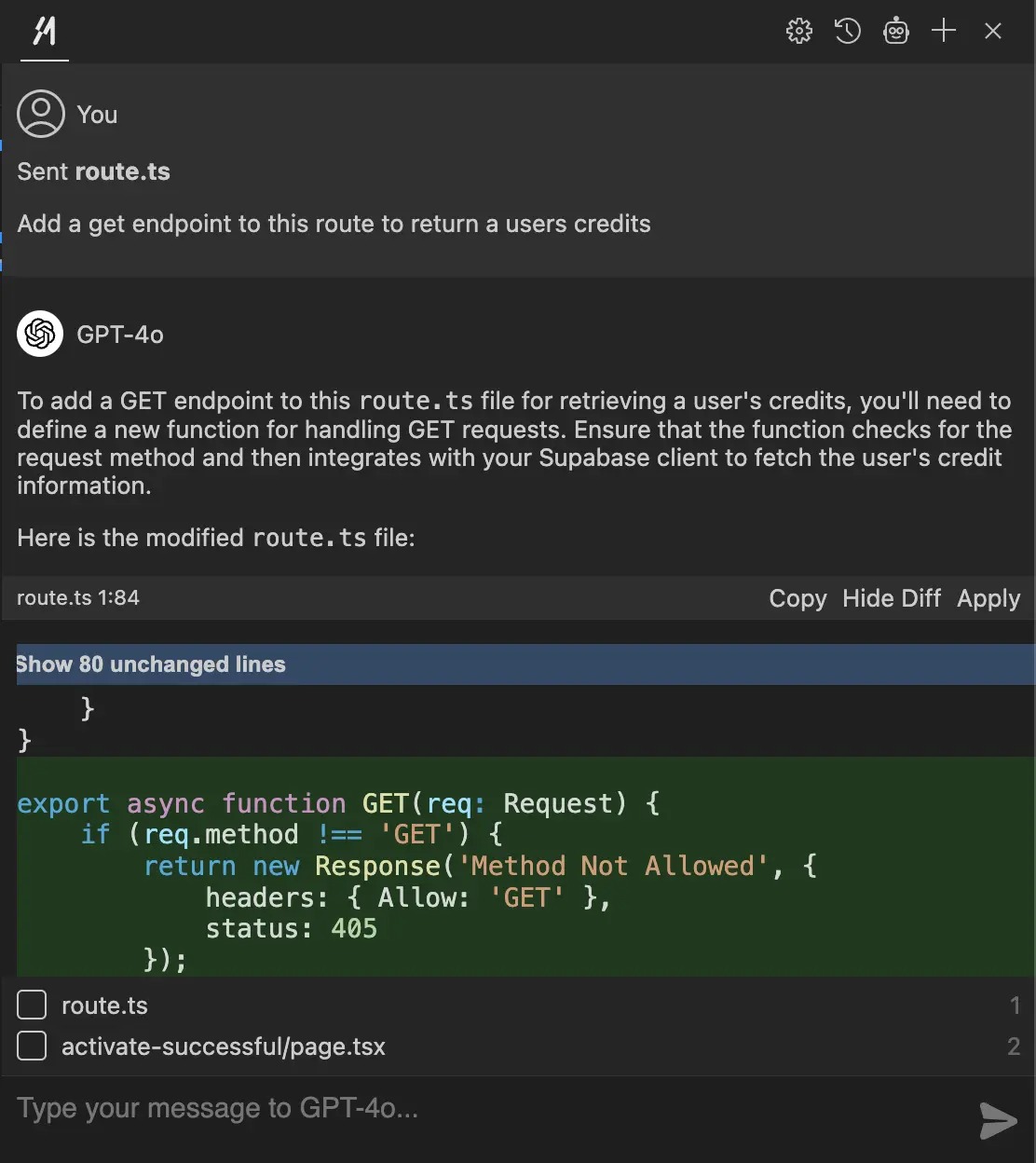
Supermaven also provides a chat interface for working with code. Developers can ask questions, request code changes, attach recently edited files, and review suggested modifications before applying them.
Multiple Programming Languages
Supermaven supports a wide range of programming languages and has dedicated support for languages such as Python, C, and C++, making it useful across different types of development projects.
Supermaven Pricing
Supermaven currently offers Free, Pro, and Team plans.
- Free: $0/month with AI code suggestions and support for large codebases.
- Pro: $10/month with a 1 million token context window, coding-style adaptation, its largest model, Supermaven Chat credits, and a 30-day free trial.
- Team: $10/month per active team member and includes Pro features plus centralized user management and billing.
Is Supermaven Easy to Use?
Supermaven is relatively straightforward to get started with. Developers can install the extension through their supported editor and begin receiving AI-powered code suggestions.
The experience is especially convenient for developers who prefer working directly inside their existing IDE instead of switching between separate AI tools.
However, like any AI coding assistant, users should review generated code carefully and test suggestions before using them in production applications.
Pros and Cons
Pros
- Fast AI code suggestions
- Large 1 million token context window on paid plans
- Works with popular code editors
- Supports large codebases
- Helpful for repetitive coding tasks
- Free plan available
- Chat-based coding assistance
Cons
- Advanced features require a paid plan
- AI-generated code still needs review
- Pricing can become a consideration for larger teams
- Beginners may need programming knowledge to use it effectively
Who Is Supermaven Best For?
Supermaven is mainly suited to software developers, programmers, students learning development, freelancers, startups, and engineering teams.
It can be particularly useful for developers working on large projects where understanding relationships between files and existing code is important.
Is Supermaven Worth It?

Supermaven can be useful if your main goal is to speed up coding without leaving your development environment. Its fast suggestions and large context window can be especially valuable when working with larger projects.
The Free plan gives developers an easy way to test the experience, while the Pro plan adds the larger context window and additional AI capabilities.
Final Verdict
Supermaven is a developer-focused AI coding assistant built around fast code completion and strong codebase context. Its support for popular editors, large context window, and integrated chat features make it a practical option for developers who want AI assistance during everyday coding.
If you regularly write code and want faster suggestions while staying inside your IDE, Supermaven is worth considering.
Frequently Asked Questions
Is Supermaven free?
Yes. Supermaven offers a Free plan with AI-powered code suggestions.
How much does Supermaven Pro cost?
Supermaven Pro currently costs $10 per month and includes additional features such as a 1 million token context window.
Does Supermaven work with VS Code?
Yes. Supermaven provides support for VS Code along with JetBrains IDEs and Neovim.
Is Supermaven good for large codebases?
Its large context window is specifically designed to help the AI work with more project information, making it useful for larger codebases.
Can Supermaven write code?
Yes. Supermaven can provide code completions and suggestions for functions, logic, and other programming tasks.