
Collecting useful feedback is essential for businesses, marketers, researchers, educators, and organizations that want to understand what their customers or audiences actually think.
SurveyMonkey is one of the best-known online survey platforms, offering tools for creating surveys, forms, quizzes, polls, collecting responses, analyzing results, and turning feedback into actionable insights.
But with free and paid plans available, plus a growing range of AI-powered features, is SurveyMonkey actually worth using?
In this SurveyMonkey review, we’ll look at its features, pricing, ease of use, AI tools, survey templates, analytics, integrations, pros and cons, and who should consider using the platform.
What Is SurveyMonkey?

SurveyMonkey is an online survey and feedback platform designed to help individuals and organizations create surveys, collect responses, and analyze feedback.
The platform can be used for a wide range of purposes, including:
- Customer satisfaction surveys
- Market research
- Employee feedback
- Product research
- Event feedback
- Academic research
- Lead generation
- Quizzes and assessments
- Brand research
- Customer experience programs
SurveyMonkey also offers solutions for individuals, teams, and larger enterprises, making it suitable for both simple surveys and more advanced research programs.
How Does SurveyMonkey Work?
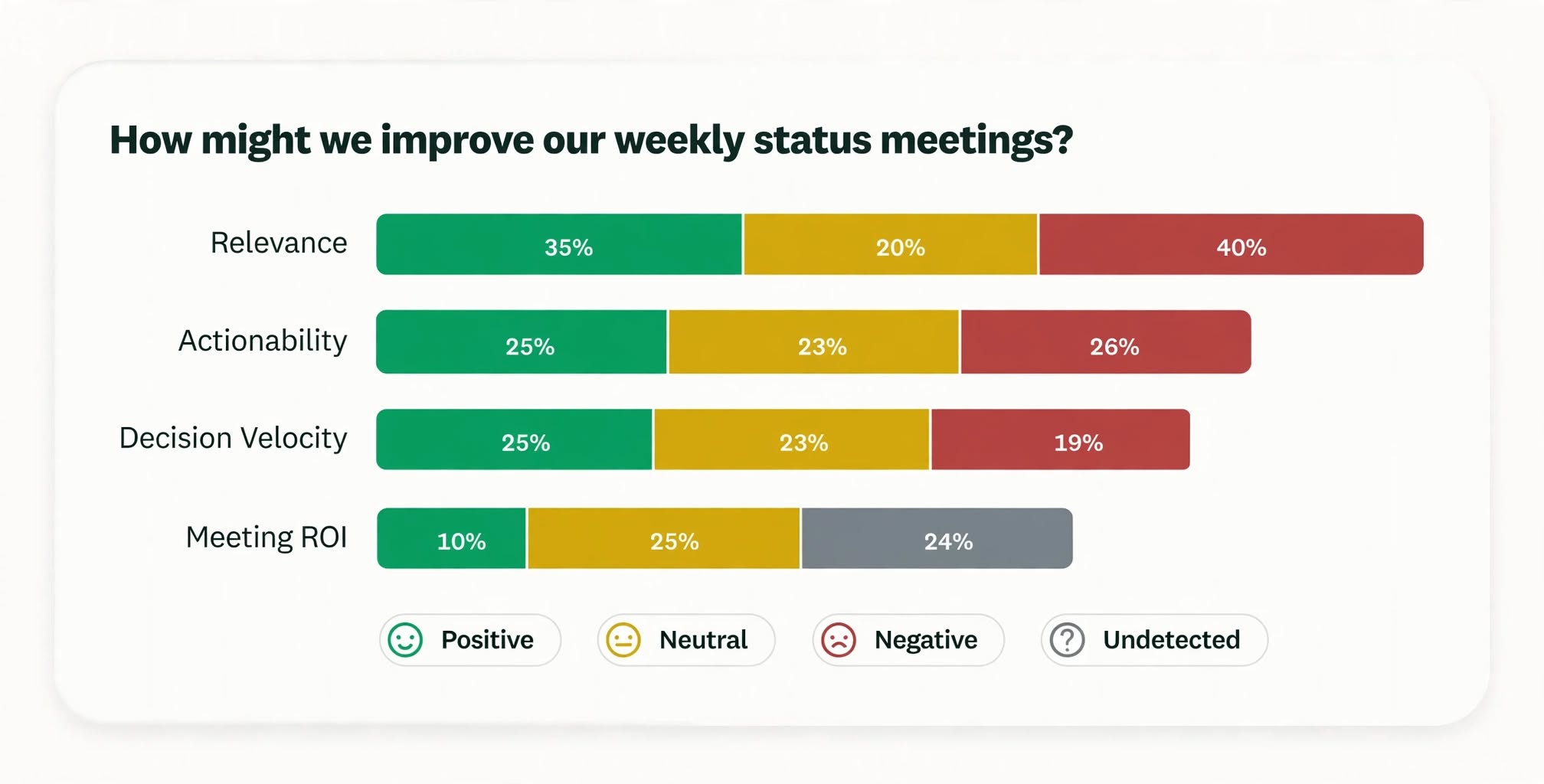
SurveyMonkey makes it possible to create a survey from scratch or use an existing template.
Once you’ve created your questions, you can customize the survey and distribute it through different channels.
Depending on your plan, SurveyMonkey supports methods such as web links, email invitations, website embeds, and other collectors.
The responses are then collected inside your SurveyMonkey account, where you can analyze the results and create reports.
The basic workflow is straightforward:
- Create your survey.
- Add and customize questions.
- Choose how you want to collect responses.
- Share the survey with your audience.
- Monitor responses.
- Analyze the results.
- Export or report your findings when supported by your plan.
This makes SurveyMonkey useful for everything from a quick customer poll to a more structured research project.
SurveyMonkey Features
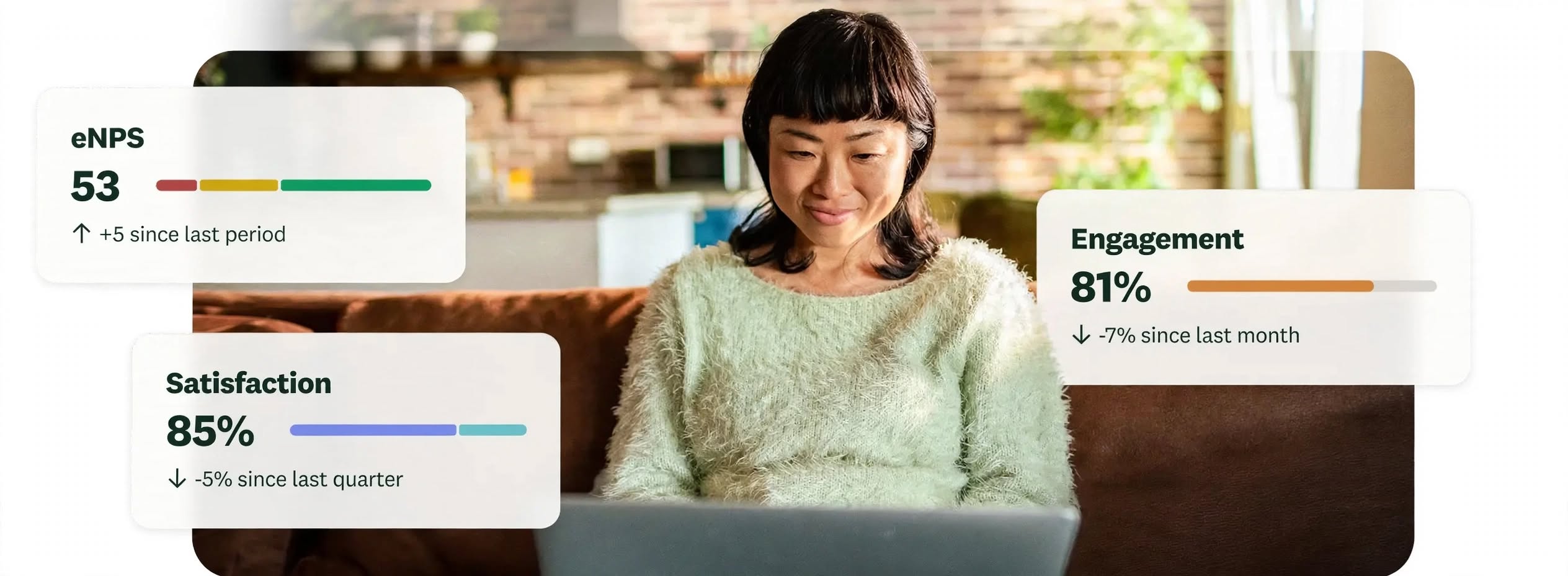
SurveyMonkey offers a broad collection of survey creation, response collection, analytics, collaboration, and research features.
Survey Builder
The survey builder allows users to create questionnaires using different question formats.
Depending on the plan, users can work with different question types, customization options, logic features, and response settings.
This makes it possible to create simple questionnaires as well as more sophisticated surveys.
Survey Templates
One of SurveyMonkey’s biggest advantages is its collection of ready-made templates.
The current individual pricing page lists 500+ expert templates and more than 1,800 pre-written questions.
Templates can help users get started faster because they don’t have to design every survey from scratch.
They can be particularly useful for common use cases such as customer satisfaction, employee feedback, event registration, and market research.
Survey Logic
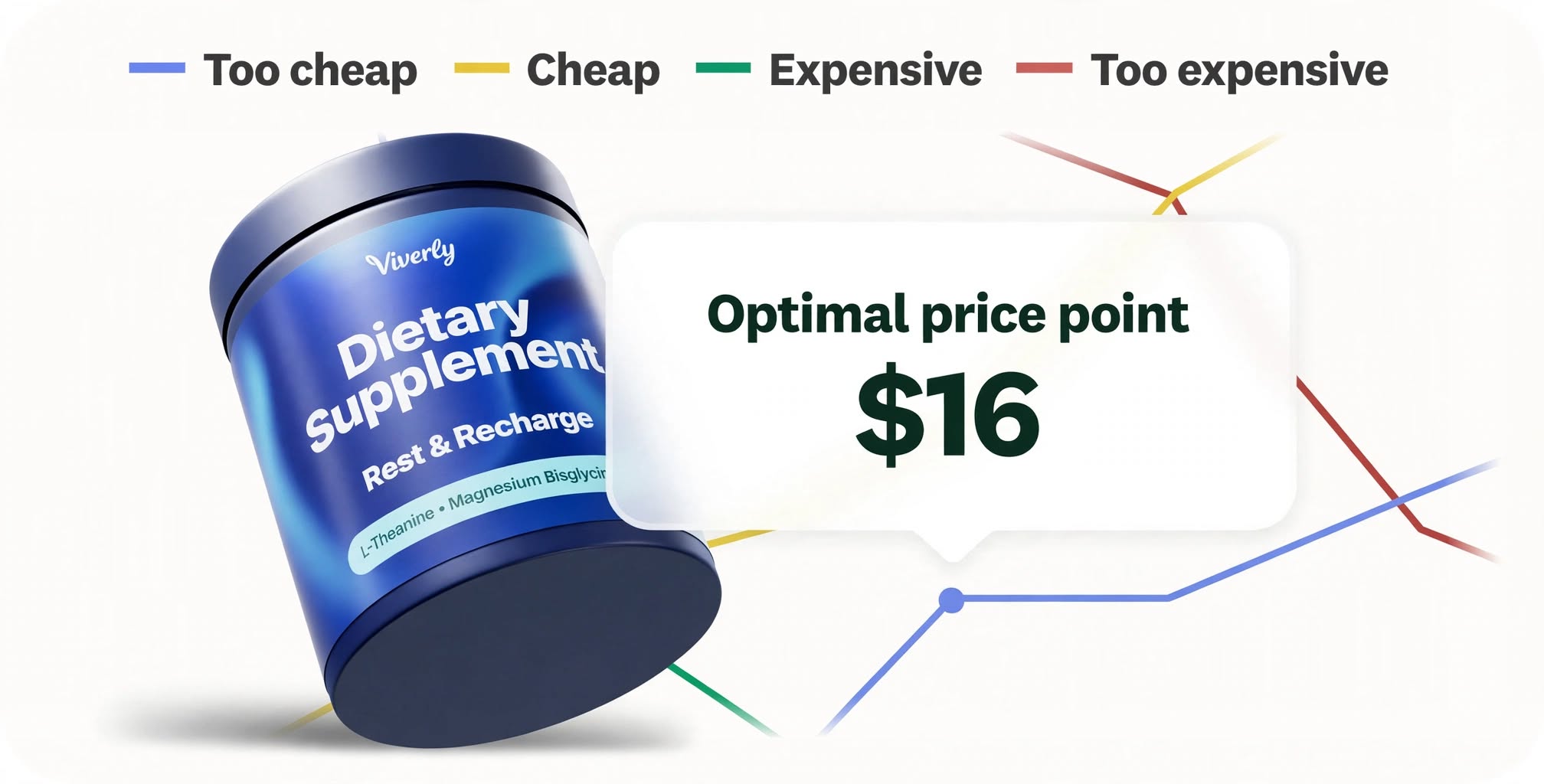
Paid SurveyMonkey plans provide more advanced survey logic.
Logic can help customize the respondent’s experience based on their previous answers.
For example, someone who answers that they haven’t used a product could be directed toward a different set of questions than someone who uses it regularly.
This can make surveys more relevant and reduce unnecessary questions.
Custom Survey Design
Paid plans offer additional customization options for businesses that want surveys to match their branding.
SurveyMonkey also has an AI-powered theme generator that can use an uploaded image, logo, or colors to generate a custom survey theme.
This can be useful when you’re sending surveys to customers and want the experience to look more professional.
SurveyMonkey AI Features

AI is now a major part of the SurveyMonkey platform.
SurveyMonkey offers AI tools designed to help with both survey creation and analysis.
Build With AI
SurveyMonkey’s Build with AI feature allows users to describe what they want to learn and generate a survey draft.
Instead of manually creating every question, you can provide a prompt describing your objective and then edit the generated survey.
SurveyMonkey says its AI can generate a survey tailored to your goals in under a minute.
AI-Powered Survey Import
If you’ve already written a survey somewhere else, SurveyMonkey’s AI can transform that content into a structured survey.
You can paste questions from documents or other applications, and the platform can assign appropriate question types and formatting.
AI Question Recommendations
SurveyMonkey can also help users select appropriate question types while building a survey.
The AI can recommend formats such as multiple choice, open-ended questions, rating scales, and other options.
Answer Genius
SurveyMonkey’s Answer Genius feature can suggest answer choices based on the question you’re creating.
This can save time when building questionnaires and help users create more complete answer options.
AI Survey Analysis
SurveyMonkey also offers AI tools for analyzing survey responses.
On eligible plans, users can ask questions about their survey results and receive insights, charts, and summaries.
Other AI-powered analysis features include thematic analysis, sentiment analysis, and response quality detection.
These features can be particularly useful when a survey receives a large number of open-ended responses.
SurveyMonkey Analytics and Reporting

Creating a survey is only half the job. The real value comes from understanding the responses.
SurveyMonkey provides analytics and reporting tools that allow users to review survey results and identify patterns.
Depending on the plan, you may have access to features such as:
- Response analysis
- Charts
- Data exports
- Statistical significance
- Cross-tab analysis
- Multi-survey analysis
- AI-powered analysis
- Thematic analysis
More advanced analytics features are generally reserved for higher-tier plans.
SurveyMonkey Integrations
SurveyMonkey can integrate with other tools and services to help organizations connect survey data with their existing workflows.
The current Standard plan, for example, lists 200+ integrations, along with data exports and email invitations.
This can be particularly useful for businesses that don’t want survey results isolated inside a single platform.
Integrations can help connect survey workflows with marketing, productivity, customer experience, and other business tools.
Is SurveyMonkey Easy to Use?
For basic surveys, SurveyMonkey is relatively straightforward.
The platform is designed so that you can choose a template or start from scratch, add questions, customize the survey, and distribute it.
The challenge comes when you move into more advanced features.
Logic, analytics, reporting, integrations, and enterprise controls naturally require more learning than creating a simple questionnaire.
For beginners, starting with a template can be one of the easiest ways to become familiar with the platform.
SurveyMonkey Pricing
SurveyMonkey offers a free Basic plan along with several paid individual and team plans.
Because pricing and plan availability can change, it’s worth checking the official pricing page before purchasing.
At the time of this review, the individual plans include the following options:
Basic Free Plan
The Basic plan is designed for simple surveys, forms, and quizzes.
According to SurveyMonkey’s current pricing information, the free plan includes:
- 1 user
- Unlimited surveys
- Up to 10 questions per survey
- Limited responses per survey
- Build with AI
- Web-link distribution
- Social sharing
- Website embedding
- Zapier integration
SurveyMonkey’s survey product page currently states that the Basic plan allows users to view up to 25 responses per survey.
This makes the free plan suitable for personal projects, small polls, and simple surveys.
Standard Monthly
The current Standard Monthly plan is listed at $129 per month for an individual account.
It includes:
- Unlimited surveys
- Unlimited questions
- 1,000 responses per month
- More question types
- Custom design
- Skip logic
- Email invitations
- Data exports
- 200+ integrations
Advantage Annual
The current Advantage Annual plan is listed at $39 per month when billed annually, or $468 annually.
It includes:
- Unlimited surveys
- Unlimited questions
- 15,000 responses per year
- Premium themes
- More logic features
- Payment collection
- Statistical significance
- Multi-survey analysis
- Analyze with AI
- Thematic Analysis
Premier Annual
The current Premier Annual plan is listed at $139 per month when billed annually, or $1,668 annually.
It increases the response allowance to 40,000 responses per year and adds features such as:
- White-label branding
- Advanced logic
- Block randomization
- Multilingual surveys
- Crosstabs
- Phone support
Team Plans
SurveyMonkey also offers plans designed for teams.
The current Team Advantage plan starts at $30 per user per month, with a minimum of three users and annual billing.
Team Premier currently starts at $92 per user per month, also with a three-user minimum and annual billing.
Enterprise plans are available for organizations that need more advanced administration, governance, security, integrations, and user management.
Is SurveyMonkey Free?
Yes. SurveyMonkey offers a free Basic plan.
The free plan is useful for simple surveys but comes with limitations on questions, responses, and advanced features.
If you need more questions, responses, logic, analytics, exports, or branding controls, you’ll likely need a paid plan.
SurveyMonkey for Businesses

SurveyMonkey can be particularly useful for businesses that regularly collect feedback.
Companies can use it for:
Customer Feedback
Businesses can ask customers about satisfaction, products, services, support experiences, and overall customer experience.
Market Research
SurveyMonkey can help organizations collect opinions from target audiences and understand preferences before making business decisions.
Product Research
Product teams can use surveys to understand feature preferences, identify problems, and gather feedback about new concepts.
Employee Surveys
HR teams can use surveys to collect employee feedback about engagement, onboarding, workplace experiences, and other internal topics.
SurveyMonkey for Students and Researchers

SurveyMonkey can also be useful for students and researchers who need to collect structured responses.
The platform’s templates, question library, distribution tools, and analysis features can simplify the process of building a questionnaire.
However, researchers working on more complex academic projects should carefully review the platform’s available statistical and export capabilities before choosing a plan.
SurveyMonkey Pros and Cons
Pros
- Easy survey creation
- Free Basic plan available
- Large template library
- 1,800+ pre-written questions
- AI-powered survey creation
- AI-powered analysis on eligible plans
- Advanced survey logic
- Multiple distribution options
- Strong reporting and analytics
- 200+ integrations on the Standard plan
- Team collaboration features
- Enterprise options available
- Suitable for businesses and research teams
Cons
- Advanced features require paid plans
- Paid plans can become expensive for smaller users
- Free plan has significant response and question limitations
- Pricing structure can be complicated
- Some advanced analytics features are limited to higher tiers
- Not every AI feature is available on every plan
Who Is SurveyMonkey Best For?
Small Businesses
SurveyMonkey can be a good choice for small businesses that want to collect customer feedback without building their own survey infrastructure.
Marketing Teams
Marketing teams can use it for market research, customer feedback, campaign testing, and audience research.
HR Teams
The platform can help HR professionals collect employee feedback and conduct internal surveys.
Researchers
Researchers who need flexible survey creation and response analysis can benefit from SurveyMonkey’s more advanced features.
Enterprise Organizations
Large organizations can use SurveyMonkey’s team and enterprise capabilities for collaboration, administration, governance, and larger-scale feedback programs.
Who Should Consider Alternatives?
SurveyMonkey may not be ideal for everyone.
If you only need a very basic form with a handful of questions, a simpler free form builder may be enough.
Likewise, users who need extremely advanced statistical research capabilities may want a specialized research platform rather than a general-purpose survey solution.
The right choice depends heavily on the complexity of your research and how many responses you expect to collect.
SurveyMonkey vs. Google Forms
Google Forms is one of the simplest alternatives to SurveyMonkey.
Google Forms can be a great choice for basic questionnaires and forms, particularly if you’re already using Google Workspace.
SurveyMonkey becomes more attractive when you need more advanced survey logic, professional templates, research tools, analytics, branding, integrations, or AI-powered survey capabilities.
SurveyMonkey vs. Typeform
Typeform is known for its conversational and visually engaging form experience.
SurveyMonkey is generally more focused on comprehensive survey functionality, research capabilities, analytics, and larger organizational use cases.
If visual presentation is your biggest priority, Typeform may be worth considering. If you want broader survey research capabilities, SurveyMonkey can be the stronger option.
Is SurveyMonkey Legit?
Yes, SurveyMonkey is a legitimate and established survey software platform.
The company currently says more than 260,000 organizations worldwide use SurveyMonkey.
SurveyMonkey also provides privacy, security, data governance, and enterprise capabilities, with its product information highlighting support for requirements such as GDPR and HIPAA compliance in relevant contexts.
As with any platform handling survey responses, organizations should review the specific privacy, security, and compliance requirements relevant to their own use case.
Is SurveyMonkey Worth It?
SurveyMonkey is worth considering if you need more than a basic online form.
Its biggest advantage is the combination of survey creation, templates, distribution, analytics, integrations, and increasingly sophisticated AI features.
The free plan is useful for simple projects, while paid plans become more valuable when you need unlimited questions, larger response volumes, survey logic, exports, advanced analysis, branding, or collaboration.
The biggest downside is cost.
For someone who only needs a simple questionnaire occasionally, paying for an advanced SurveyMonkey plan may not make financial sense.
But for businesses, marketers, researchers, HR teams, and organizations that regularly collect feedback, the platform can provide substantially more functionality than a basic form builder.
Final Verdict
SurveyMonkey is a powerful and flexible survey platform with enough features to support everyone from casual users to large organizations.
Its combination of templates, survey logic, analytics, integrations, and AI-powered creation and analysis makes it one of the more comprehensive options for collecting and understanding feedback.
The free Basic plan is a good starting point for simple surveys, while the paid plans make more sense for users who need advanced functionality or higher response limits.
Overall, SurveyMonkey is worth it for businesses and serious survey users who need advanced tools, but casual users may be better served by a simpler free alternative.
Frequently Asked Questions
Is SurveyMonkey free?
Yes. SurveyMonkey offers a free Basic plan with limited questions and responses.
How many questions can you ask on SurveyMonkey for free?
The current Basic plan allows up to 10 questions per survey.
Is SurveyMonkey good for market research?
Yes. SurveyMonkey provides templates, survey logic, response collection, analytics, and research-oriented features that can be useful for market research.
Does SurveyMonkey use AI?
Yes. SurveyMonkey offers AI features for survey creation, question recommendations, survey themes, response analysis, thematic analysis, sentiment analysis, and response-quality detection. Feature availability depends on the plan and region.
Can SurveyMonkey analyze survey responses?
Yes. SurveyMonkey provides response analysis and reporting tools, with more advanced analytics and AI analysis available on eligible paid plans.
Does SurveyMonkey have survey templates?
Yes. SurveyMonkey currently lists more than 500 expert templates and more than 1,800 pre-written questions on its individual pricing page.
Is SurveyMonkey better than Google Forms?
SurveyMonkey is generally better suited to users who need advanced survey logic, analytics, templates, integrations, branding, and research capabilities. Google Forms can be a better choice for simple forms and questionnaires.
Is SurveyMonkey worth paying for?
It depends on your needs. If you regularly conduct surveys or need advanced analysis and customization, a paid plan can be worthwhile. For occasional basic surveys, the free plan or a simpler alternative may be sufficient.