Managing leads, contacts, follow-ups, sales opportunities, and customer relationships can become complicated as a business grows. A good CRM can help sales teams keep everything organized while making it easier to understand where every deal stands.
Pipedrive is a sales-focused CRM designed around visual pipeline management, sales automation, lead management, reporting, integrations, and AI-powered sales tools. The platform is used by more than 100,000 companies across 179 countries and offers more than 500 integrations.
But is Pipedrive worth paying for, and is it the right CRM for your business?
In this Pipedrive review, we’ll look at its features, ease of use, AI tools, automation, pricing, integrations, pros and cons, and the types of businesses that may benefit from using it.
What Is Pipedrive?

Pipedrive is a cloud-based customer relationship management (CRM) platform built primarily for sales teams.
Instead of treating CRM software simply as a database for storing customer information, Pipedrive focuses heavily on helping businesses visualize and manage their sales process.
Its visual pipeline allows sales representatives to see leads and deals at different stages, update their progress, schedule activities, and manage follow-ups from one centralized workspace.
Pipedrive also combines CRM functionality with sales automation, reporting, AI-powered tools, email management, lead generation, integrations, and other business features.
How Does Pipedrive Work?
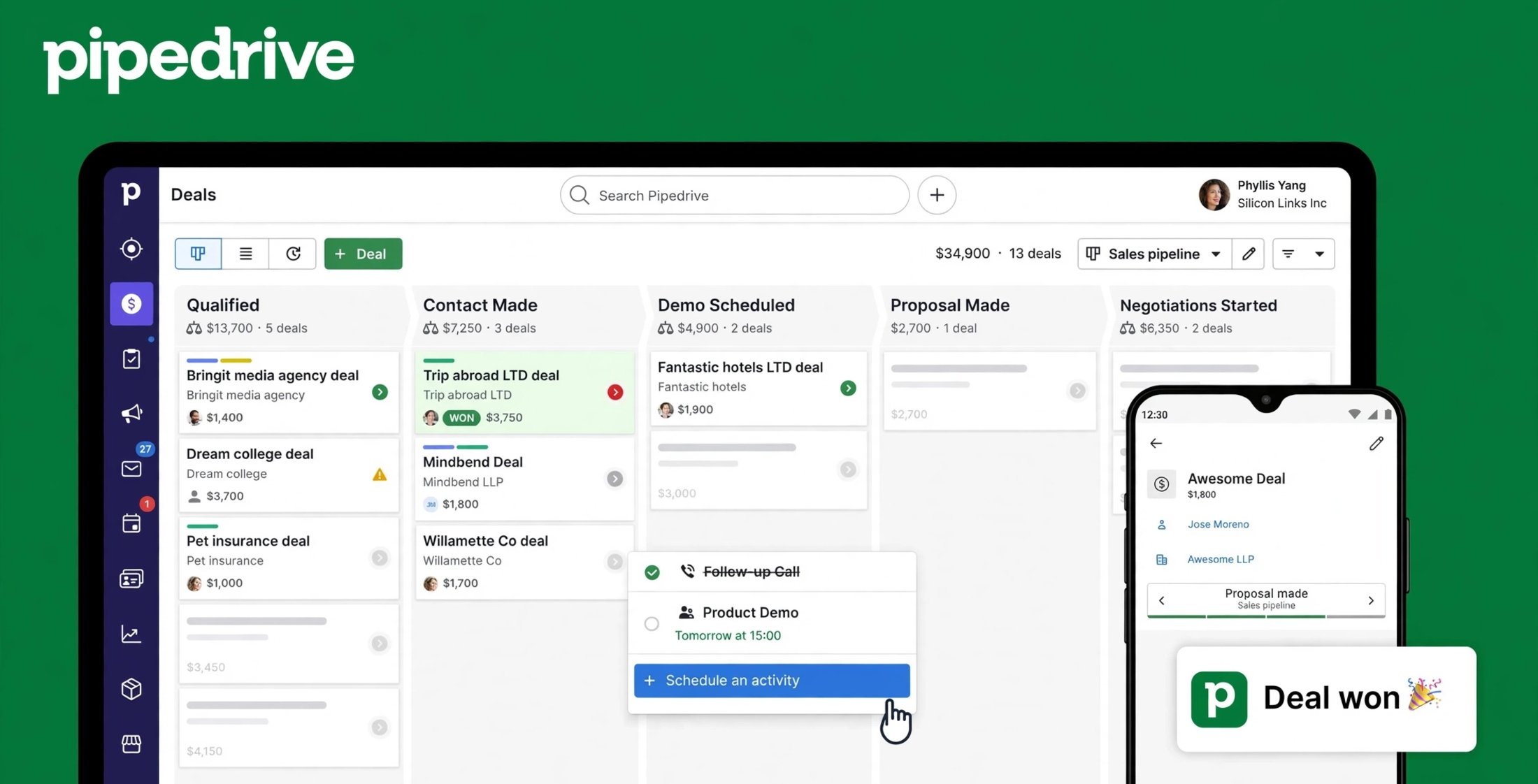
Pipedrive is built around the idea of managing sales activities and moving deals through a defined pipeline.
After setting up an account, businesses can create pipelines that match their sales process. Deals can then be added to different stages and moved forward as prospects progress toward a purchase.
The platform can also store information about contacts, organizations, activities, emails, meetings, notes, and deals.
This gives sales teams a visual overview of their pipeline rather than forcing them to manage opportunities through spreadsheets or disconnected tools.
Visual Sales Pipeline
The visual pipeline is one of Pipedrive’s central features.
Teams can customize pipeline stages according to their sales process and use a drag-and-drop interface to move deals between stages.
For example, a business could create stages such as:
- New Lead
- Qualified
- Contacted
- Proposal Sent
- Negotiation
- Won
- Lost
The exact stages can be customized to match the organization’s workflow.
Lead and Contact Management
Pipedrive allows businesses to organize leads, contacts, organizations, and deal information in one system.
Teams can use custom fields to capture information that matters to their particular sales process and import data from spreadsheets or other CRM systems.
This can make it easier for sales representatives to understand a prospect’s history before making contact.
Pipedrive Features
Pipedrive offers a broad range of sales and CRM features, although the exact availability depends on the subscription plan.
Pipeline Management
Pipeline management is at the heart of Pipedrive.
Users can create customizable pipelines, organize deals by stage, customize deal cards, and track activities associated with each opportunity.
This visual approach can be particularly useful for sales teams that want a quick understanding of their current opportunities.
Sales Automation
Pipedrive includes workflow automation tools that can handle repetitive sales activities.
Depending on the plan, teams can automate tasks such as follow-ups, email sequences, lead routing, and other recurring processes.
Automation can help reduce repetitive administrative work and allow sales representatives to spend more time on active opportunities.
Email Tracking
Pipedrive can connect with business email accounts and provide email-related sales functionality.
On eligible plans, users can synchronize Gmail, Outlook, or company email accounts, send emails, track opens and link clicks, and create automated email sequences.
This can help sales teams keep communication connected to the appropriate contacts and deals.
Sales Reporting and Analytics
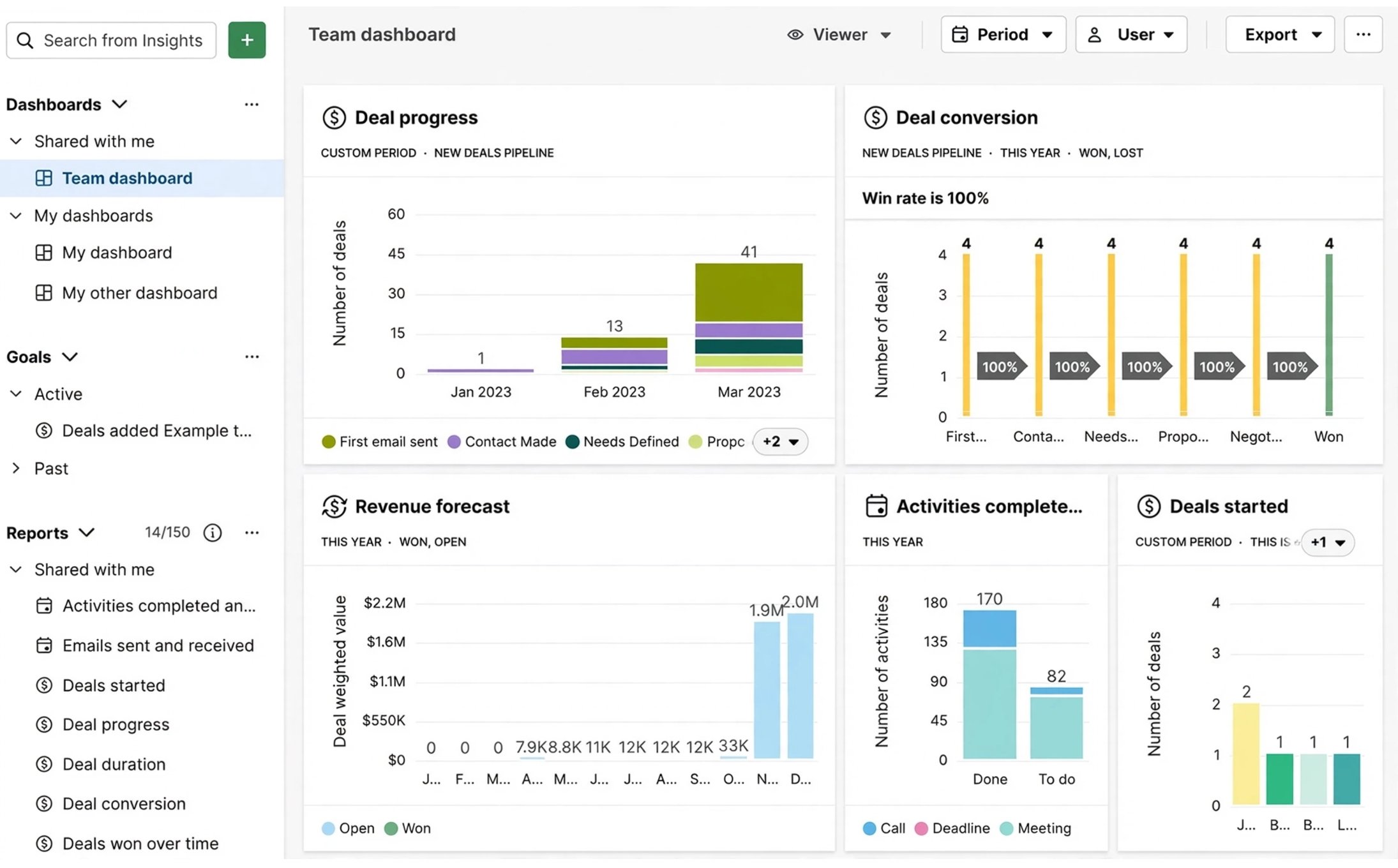
Pipedrive provides sales dashboards and reporting tools for monitoring performance.
Teams can track sales activity, pipeline performance, revenue forecasts, goals, and other sales metrics.
Its reporting tools are designed to help sales managers identify bottlenecks and understand how deals are progressing through the funnel.
Meeting Scheduling
Pipedrive also includes scheduling features that allow prospects to choose available meeting times.
Users can create meeting links and connect scheduling with services such as Google Meet, Zoom, and Microsoft Teams.
This can reduce the back-and-forth involved in arranging sales calls.
Pipedrive AI Features
AI has become an increasingly important part of Pipedrive.
Pipedrive AI includes tools designed to reduce manual work, assist with communication, analyze sales information, and help teams prioritize opportunities.
AI Sales Assistant
Pipedrive’s AI Sales Assistant can analyze sales data and provide insights about deals, performance, trends, and opportunities.
It can help users identify patterns, understand reasons behind lost deals, review customer information, and monitor progress toward sales goals.
AI Email Creation
Pipedrive also offers AI-powered email creation tools that can generate personalized sales emails from simple prompts.
This can be useful when sales representatives need to create follow-up messages without writing every email from scratch.
AI-Powered Deal Insights
Pipedrive’s AI tools can help identify opportunities and recommend actions based on sales information.
Its AI notifications can predict deal win probability and recommend next actions, helping teams focus their attention on selected opportunities.
AI feature availability can vary depending on the plan and feature status, with some capabilities introduced as beta features.
Pipedrive Integrations
CRM software becomes much more useful when it works with the other tools a business already uses.
Pipedrive offers more than 500 integrations through its marketplace. These cover areas such as communication, marketing, productivity, project management, lead generation, and other sales-related workflows.
Pipedrive specifically highlights integrations with tools such as Zapier, Zoom, Slack, Google, QuickBooks, Asana, and other business applications.
This makes Pipedrive suitable for businesses that want to connect their CRM with an existing technology stack.
Is Pipedrive Easy to Use?
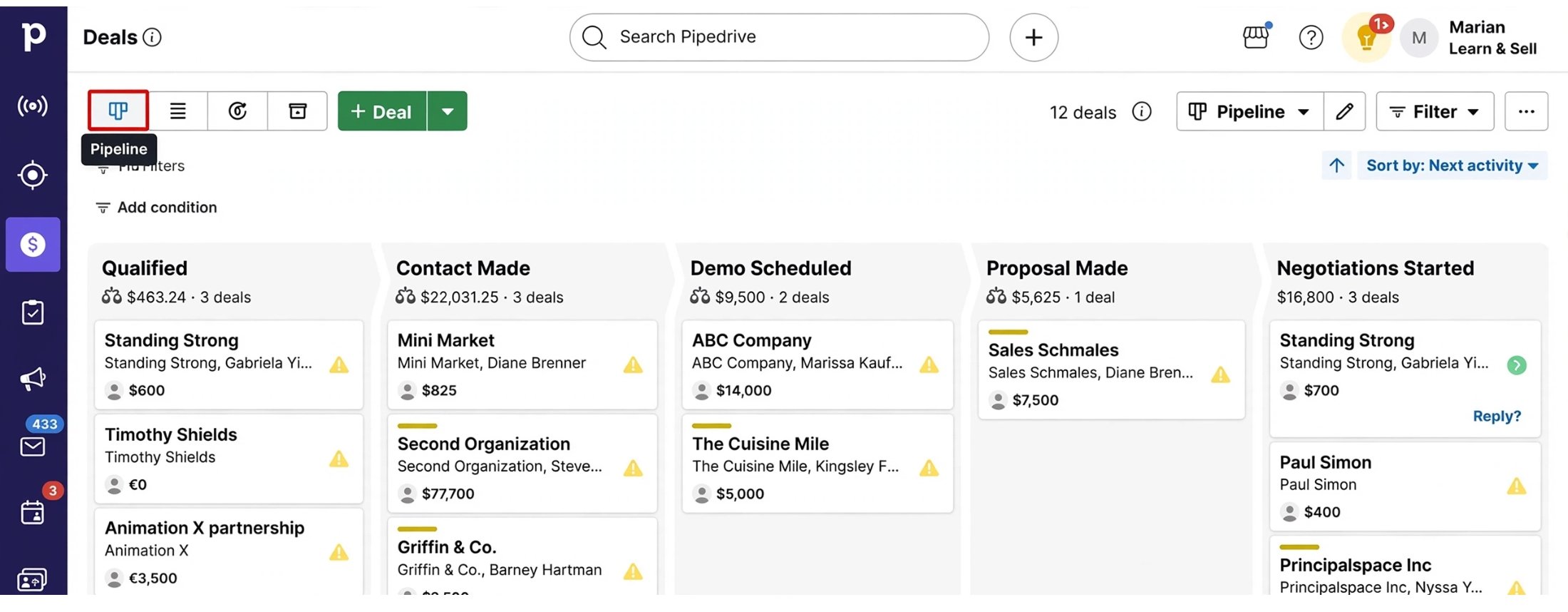
Ease of use is one of Pipedrive’s major selling points.
The visual pipeline provides a straightforward way to understand where deals are in the sales process. Instead of navigating through complex tables, sales representatives can work with a visual representation of their opportunities.
Pipedrive also offers customizable pipelines, deal cards, fields, dashboards, and workflows, allowing businesses to adapt the platform to their processes.
However, businesses with complex CRM requirements may still need time to configure automations, integrations, custom fields, reports, and permissions.
Pipedrive Pricing
Pipedrive offers four main subscription plans: Lite, Growth, Premium, and Ultimate.
Current pricing shown by Pipedrive for annual billing is:
| Plan | Starting Price | Main Focus |
|---|---|---|
| Lite | $14/user/month | CRM and pipeline management |
| Growth | $39/user/month | Email sync, automation and nurturing |
| Premium | $59/user/month | Advanced sales and lead-generation tools |
| Ultimate | $79/user/month | Additional security, enrichment and advanced capabilities |
Pipedrive also offers a 14-day free trial, with no credit card required.
Prices can change, and billing terms may differ depending on the selected billing cycle and region.
Pipedrive Lite
The Lite plan focuses on core CRM functionality.
It includes lead, deal, contact, calendar, and pipeline management, along with AI-powered report creation, a real-time sales feed, data import, and access to 500+ integrations.
Pipedrive Growth
Growth adds more sales automation and email functionality.
It includes full email synchronization with tracking, automated workflows, personalized email sequences, subscriptions and forecast reports, meeting scheduling, and contact timelines.
Pipedrive Premium
Premium adds more advanced sales functionality, including lead generation and routing, custom scoring, company data enrichment, AI-powered email tools, shared inbox functionality, contracts, and e-signatures.
It also provides enhanced customization for teams, reports, data fields, permissions, and deal calculations.
Pipedrive Ultimate
Ultimate is designed for organizations that need additional security and advanced capabilities.
It adds features such as security alerts, password requirements, IP and time-based access restrictions, contact data enrichment, sandbox testing, and extended phone support.
Pipedrive Add-Ons
Businesses can also expand Pipedrive through optional add-ons.
Current options include:
- LeadBooster
- Projects
- Campaigns
- Web Visitors
- Smart Docs
Pipedrive lists these as optional additions that can extend the platform beyond its core CRM functionality.
This modular approach can be useful for businesses that don’t need every feature from the beginning.
Pipedrive for Small Businesses
Pipedrive can be particularly useful for small businesses that want a dedicated sales CRM without building a complicated system from scratch.
Its visual pipeline makes it possible to see active opportunities quickly, while automation can reduce repetitive follow-up tasks.
Small sales teams can also start with core CRM functionality and add more advanced features as their sales processes become more sophisticated.
Pipedrive for Sales Teams
Sales teams are one of Pipedrive’s primary use cases.
The combination of pipeline management, contact organization, email tracking, activity management, automation, reporting, and AI tools can provide sales representatives with a centralized workspace.
Sales managers can also use dashboards and reports to monitor team activity and sales performance.
Pipedrive for Marketing
Although Pipedrive is primarily sales-focused, it can also support marketing-related workflows through integrations and its Campaigns functionality.
Businesses can connect CRM information with marketing tools and use customer data to support lead-generation and communication processes.
For organizations that need advanced marketing automation as their primary requirement, however, a specialized marketing platform may still be more appropriate.
Pipedrive Mobile App
Pipedrive also provides mobile apps for Android and iOS.
The mobile experience allows sales professionals to access CRM information while away from their desks, prepare for meetings, manage activities, and follow up with prospects.
This can be useful for salespeople who frequently work outside the office.
Pipedrive Pros and Cons
Pros
- Visual and customizable sales pipelines
- Strong focus on sales management
- Lead and contact organization
- Sales automation capabilities
- AI-powered sales tools
- Email tracking and synchronization
- Sales reports and forecasting
- 500+ integrations
- Mobile apps for Android and iOS
- 14-day free trial
- Multiple subscription tiers
Cons
- Advanced features require higher-priced plans
- Optional add-ons can increase the overall cost
- Businesses with very complex requirements may need additional configuration
- Primarily designed around sales workflows
- Some AI features vary by plan or availability
Who Is Pipedrive Best For?
Pipedrive may be a good fit for:
Small and Medium-Sized Sales Teams
Teams that need a straightforward way to organize leads and deals can benefit from the visual pipeline approach.
Sales Representatives
Individual sales professionals can use Pipedrive to organize activities, contacts, follow-ups, and opportunities.
Growing Businesses
Companies that expect their sales operation to become more sophisticated can use automation, reporting, integrations, and additional CRM features as they grow.
Businesses That Use Multiple Software Tools
With more than 500 integrations, Pipedrive can connect with many of the applications businesses already use.
Who May Want an Alternative to Pipedrive?
Pipedrive may not be the ideal choice for every organization.
Businesses looking for a CRM that places much greater emphasis on areas such as enterprise-wide customer service, complex marketing automation, or highly customized business processes may want to compare several CRM platforms before choosing one.
Likewise, very small businesses that only need basic contact storage may not require a full-featured sales CRM.
Is Pipedrive Legit?
Yes. Pipedrive is an established CRM software company with a global customer base.
Pipedrive states that its platform is trusted by more than 100,000 companies across 179 countries. It also highlights security controls including AES-256 encryption, SOC 2 compliance, permissions, and account security features.
The company also provides a 14-day free trial, allowing prospective customers to test the platform before committing to a subscription.
Is Pipedrive Worth It?
Pipedrive can be worth considering if your main priority is sales pipeline management and CRM organization.
Its biggest strengths are the visual pipeline, customizable sales process, automation, reporting, integrations, and growing collection of AI-powered features.
The main consideration is cost. While the entry-level plan provides core CRM functionality, businesses that need advanced automation, lead generation, AI email tools, e-signatures, or enhanced customization may need a higher plan.
For sales-focused businesses, the ability to centralize contacts, deals, activities, communication, and sales insights can make the subscription easier to justify.
Pipedrive Review: Final Verdict
Pipedrive is a sales-focused CRM built around a simple idea: make the sales pipeline easier to visualize, manage, and act on.
Its combination of customizable pipelines, lead management, automation, email tracking, reporting, integrations, mobile access, and AI features makes it a versatile option for sales teams and growing businesses.
The platform isn’t necessarily designed to be the perfect CRM for every type of organization, but businesses that primarily want to improve sales organization and pipeline visibility may find Pipedrive particularly useful.
With a 14-day free trial available, potential users can test the workflow and features before deciding whether Pipedrive fits their sales process.
Frequently Asked Questions About Pipedrive
What is Pipedrive used for?
Pipedrive is primarily used for CRM and sales management. It helps businesses organize contacts, manage leads, visualize sales pipelines, automate workflows, track activities, and analyze sales performance.
Is Pipedrive a CRM?
Yes. Pipedrive is a web-based sales CRM designed to help businesses manage customer relationships and sales pipelines.
Does Pipedrive have a free plan?
Pipedrive currently offers a 14-day free trial rather than a permanently free main CRM plan. The trial provides access without requiring a credit card.
How much does Pipedrive cost?
Pipedrive’s current annual-billing prices start at $14 per user per month for Lite, followed by $39 for Growth, $59 for Premium, and $79 for Ultimate.
Does Pipedrive have AI features?
Yes. Pipedrive offers AI-powered features including AI email creation, AI-assisted reporting, AI notifications, marketplace recommendations, and its AI Sales Assistant. Feature availability depends on the plan and feature status.
How many integrations does Pipedrive have?
Pipedrive currently advertises more than 500 integrations through its marketplace.
Is Pipedrive good for small businesses?
Pipedrive can be suitable for small businesses that need structured sales pipeline management, lead tracking, automation, and CRM functionality without relying on spreadsheets.
Does Pipedrive have a mobile app?
Yes. Pipedrive provides mobile apps for Android and iOS, allowing users to manage CRM information and sales activities while on the go.