
Reading long PDF documents, research papers, and business reports can take a lot of time. Humata is an AI-powered document analysis platform designed to help users understand files, generate summaries, and find important information without reading every page manually.
Whether you are a student, researcher, business professional, or part of a team, Humata provides tools that can simplify document research and information management.
What Is Humata?

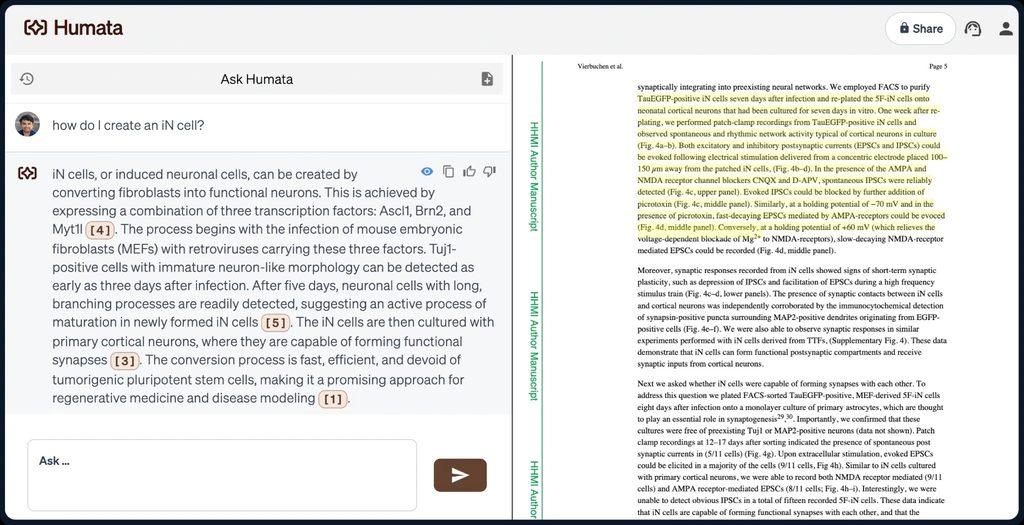
Humata is an AI-powered document assistant that allows users to upload PDFs and other supported documents, ask questions, and receive answers based on their file content.
Instead of manually searching through lengthy documents, users can interact with their files through a chat-based interface. Humata also provides citations that help users identify the source of the information.
The platform is particularly useful for research, document analysis, business reports, and managing large collections of information.
What Can You Do With Humata?
Chat With PDF Documents
Humata allows users to upload PDF documents and ask questions about their contents. The platform analyzes the information and generates answers, helping users locate relevant details more efficiently.
Summarize Long Documents
Users can generate summaries of lengthy research papers, reports, manuals, and other documents. This can save time when reviewing large amounts of information.
Analyze Multiple Documents
Humata supports questions across multiple uploaded files, making it useful for comparing reports, examining research findings, and identifying information across documents.
Get Answers With Citations
One of Humata’s useful features is its source citation system. Generated answers include references to relevant sections of uploaded documents, allowing users to verify important information.
Collaborate With Teams
Humata also provides team-focused features such as shared document access, folder permissions, and role-based access controls on applicable plans.
Humata Pricing
Humata offers different pricing options based on document usage and team requirements.
- Free – $0: Includes basic features, up to 60 pages, and 10 answers.
- Expert – $9.99/month: Includes 500 pages, three users, and additional pages at $0.02 per page.
- Team – $49/user/month: Includes 5,000 pages, team permissions, OCR for scanned documents, and additional pages at $0.01 per page.
- Enterprise – Custom Pricing: Designed for organizations requiring larger-scale document management and customized business solutions.
Pricing, usage limits, and available features may change, so users should review the latest plan details before subscribing.
Is Humata Easy to Use?
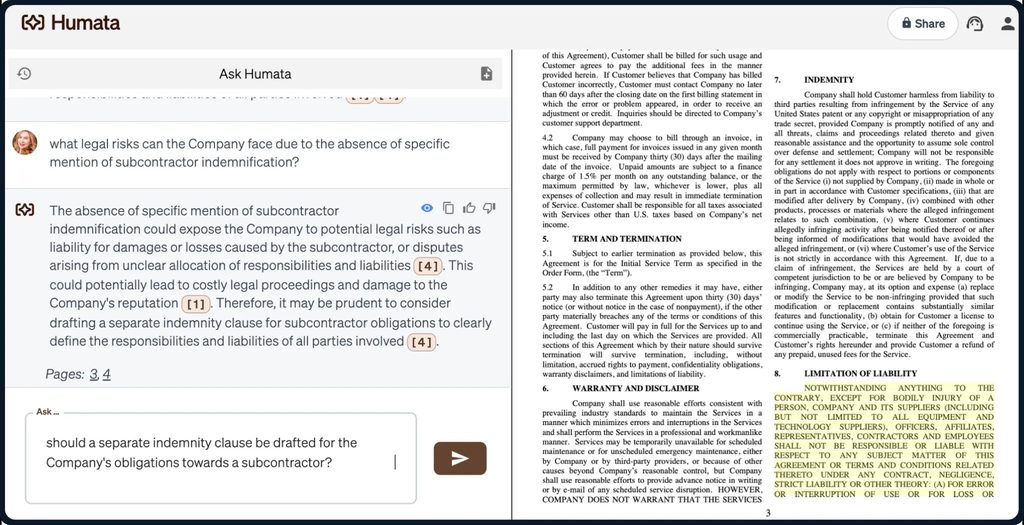
Humata is designed to make document analysis straightforward. Users can upload their files, enter questions, and receive responses through a simple chat interface.
The platform reduces the need to manually search through long documents, which can be especially helpful for students and professionals handling large amounts of written information.
However, users should still verify AI-generated answers against the original documents when accuracy is important.
Pros and Cons of Humata
Pros
- AI-powered PDF analysis.
- Quick document summaries.
- Chat-based document questions.
- Supports multiple-file analysis.
- Answers with source citations.
- Free plan available.
- Team collaboration and permission controls.
Cons
- Free plan has limited usage.
- Some advanced features require paid plans.
- AI-generated answers may require verification.
- Additional document processing can increase costs.
Who Is Humata Best For?
Humata can be useful for students, researchers, educators, business analysts, consultants, and professionals who regularly work with lengthy documents.
It can also benefit organizations that need to manage shared documents, extract information from reports, and provide team members with convenient access to important knowledge.
Is Humata Worth It?
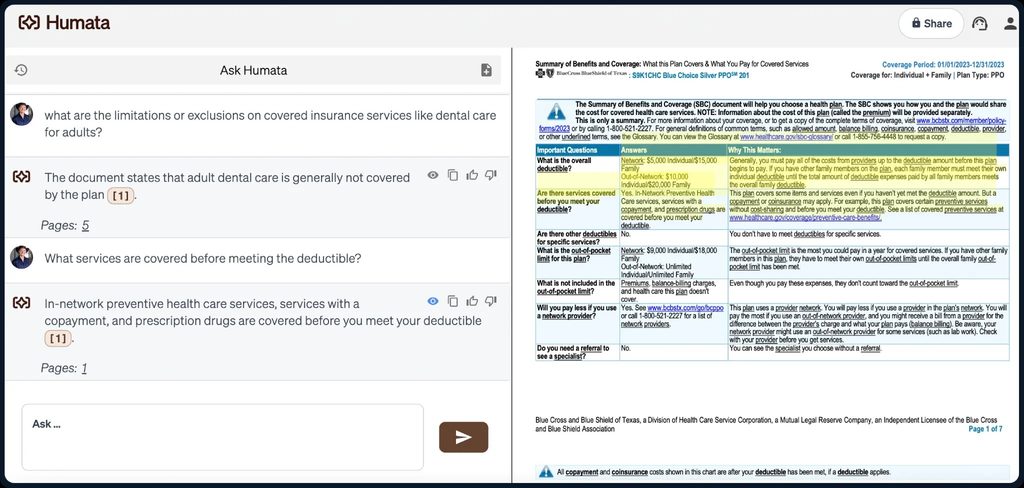
Humata can be worth considering if you frequently work with long PDF documents and need a faster way to extract important information.
Its document summaries, question-answering capabilities, source citations, and team collaboration features can make research and document management more efficient.
However, users who only occasionally need to summarize a short PDF may find the free plan sufficient.
Final Verdict
Humata is a useful AI-powered document analysis platform for people who regularly work with research papers, business reports, and other lengthy files.
Its ability to answer questions, generate summaries, and provide source citations makes it a practical option for document-heavy workflows.
If you want to spend less time searching through files and more time using the information they contain, Humata is worth exploring.
Frequently Asked Questions
What is Humata used for?
Humata is used for analyzing PDF documents, generating summaries, answering questions, and finding information within uploaded files.
Is Humata free to use?
Yes. Humata offers a free plan with limited document processing and answer generation.
Can Humata summarize PDF documents?
Yes. Users can upload supported PDF documents and request summaries of their content.
Does Humata provide source citations?
Yes. Humata provides references to relevant sections of uploaded documents so users can verify generated answers.
Is Humata suitable for businesses?
Yes. Humata offers collaboration and access-management features that can be useful for business teams and organizations.